Ed Techsploration
  • Educational Technology
    • Educational Technology
    • Technology & the Common Core >
      • Technology & the Common Core
      • Research, Literacy and Technology
    • Flipped Classroom
    • International Projects >
      • Maya-Tech Examples
  • Resources
    • Apps & Digital Tools
    • Additional Resources
  • Workshops & Trainings
    • Overview
    • Professional Development
    • Workshop Offerings
    • Prior Trainings and Consultations
  • Blog
  • About
    • About
    • Contact
  • WORKSHOP PARTICIPANTS
  • Infographics
  • New Page

Blendspace: Easily Create Lessons from Digital Content

12/30//2013

Along with a growing number of teachers, you probably post and distribute content to your students online. Cloud storage drives, such as Dropbox or Google Drive, allow you to post files for your students to access. You can send them to YouTube, TeacherTube or other sites to watch videos and you can certainly give them links to various content-specific websites you’ve come to rely upon.

But there are several problems with this approach that you may have discovered by now:
1. Assigned files can be hard to find as they often reside in different locations.

2. The relationship between the resources can become obscure.

3. The type, format and nature of the various materials might vary widely, possibly even leading to access problems.

4. The learning goals can get lost as students navigate the web.

5. Students can be distracted with other content. YouTube… Need I say more?

6. You can’t interact with your students, and they can’t engage with each other, as they navigate through you materials.

7. There’s no accountability: You have no way to know who is viewing what, or what their take-away is.

Picture
Navigating teacher-provided links out of context can confuse students.

Digital content management made easy:

Blendspace (formerly Edcanvas) was the second in a set of educational technologies that I introduced during the UC Berkeley History-Social Science’s Summer Institute on “Using Media and Primary Sources in Instruction”.  This web tool directly tackles the issues of content management, lesson construction, presentation and student tracking. (See my posts on Diigo and VoiceThread for the other two.)

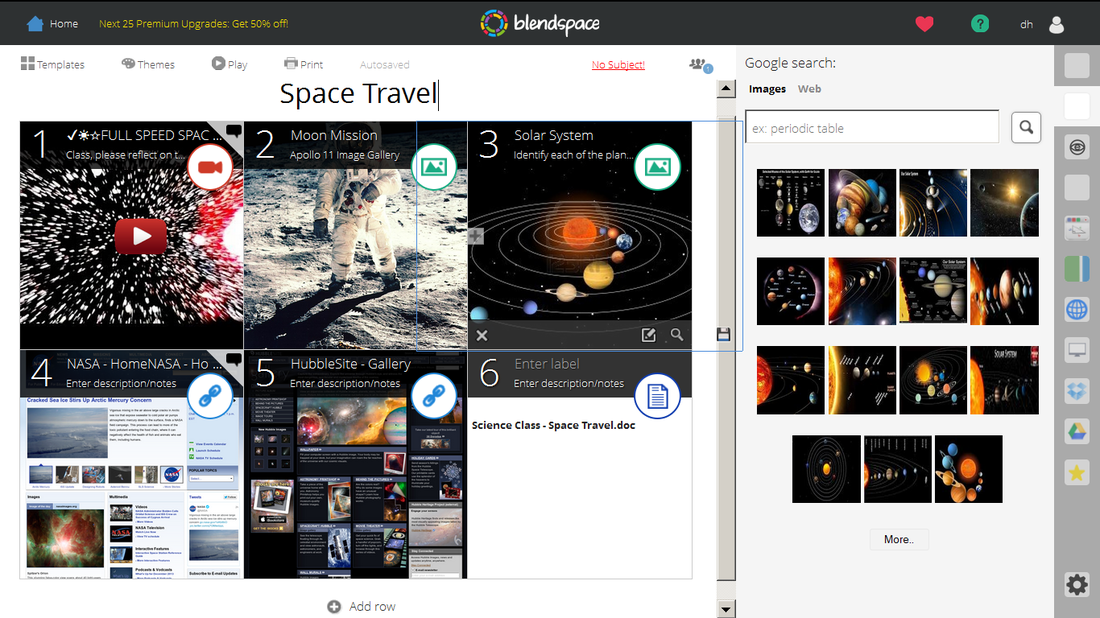
Image: Sample Blendspace lesson
Simply drag and drop content onto the panels: Videos, images, documents ... even whole, live webpages can be included in the presentation.

Work with content from multiple sources

A Blendspace lesson consists of multiple slides on which you assemble and organize materials from virtually any combination of sources.

Starting with a blank slide, you can write text, insert images and videos, upload Word documents or pdf’s, or even embed entire presentations made in PowerPoint or Prezi. Your students simply move through the pages (slideshow-style) as they freely explore the set of resources you’ve compiled for the lesson.

Sets of lessons can be arranged and managed in one or more 'classes' you setup in Blendspace, accessible only to your students with you 'class code'.
Explore the  "Space Travel" demo lesson shown at right.

Engage your students online

Designed for educators, Blendspace allows you to set up private classes for your students. Using the sidebar comment area alongside each page, you can initiate discussions among the students.  Students can type their responses or record audio comments. They can also privately request your help if they’re having trouble with the assignment. 

Are your students visiting the site? With a set of basic analytics, you can track your students’ viewing patterns and can see how much time each student has spent on lesson and view their questions and comments.
Several types of built-in quizzes allow for you to check understanding, and students can download documents straight from the slides to continue work on an assignment.

If you are looking to move your content online for occasional assignments or as part of a flipped classroom, check out what Blendspace has to offer.

BlendSpace - Quick Visual Tour:

Photo Credits:
  • "Computer Problems": Creative Commons. College Degrees 360   
  • Blendspace Screen Shot & Video: "Space Travel" - Blendspace Demo Lesson by Devin Hess
Please add your comments below. Share this post with others.
(Tip - check "I'd rather post as guest" if you don't want to create a "Disqus" account)

Return to Blog Posts
comments powered by Disqus
Follow on Twitter


Google+
Top Blog Posts:
  • Top New Google Add-Ons for Docs 
  • Digital Texts and the New Literacy
  • The New Digital Divide  Increases Inequity
Workshop Schedule
Google For Education Certificated

Contact
Copyright 2015-18. Devin Hess, Ed Tech'sploration